Have you ever opened an Excel worksheet and wondered, what all the extra function buttons were for? Is there really any use for anything other than the SUM function? Well actually there is!
The definition of a function is a calculation tool that performs a predefined operation. Most of us are already familiar with the SUM function, which adds the values of a range. Did you know that Excel provides hundreds of functions? Below are the categories and a brief example of the type of functions they calculate:
• Financial - Calculate loan payments, depreciation, interest rates and internal rate of returns
• Date and Time - Display today's date and/or time; calculate the number of days between dates
• Math and Trig - Round off numbers, calculate sums, logs and least common multiple; generate random numbers
• Statistical - Calculate average, standard deviation and frequencies; find minimum and maximum; count how many numbers are in a list
• Lookup and Reference - Look for a value in a range of cells; find the row or column location of a reference
• Database - Perform crosstabs, averages, counts and standard deviation for an Excel database
• Text - Convert numbers to text; compare two text entries; find the length of a text entry
• Logical - Perform conditional calculations
• Engineering - Convert binary to hexadecimal and binary to decimal; calculate Bessel function
Each function has a syntax which tells you the order you must type the information, where to put commas, parentheses and other punctuation. Example: The syntax for SUM is SUM(range) and must be entered as =SUM(A2:A5).
The best way to enter unfamiliar formulas into a cell is to use the Paste Function Button. All you have to do is answer some basic questions and the wizard will put the values in the correct part of the function.
Visit us next week on how to use the Paste Function Button!
If you found this helpful and you want more great tips sign up for our free report on "Top 10 VA Skills Most Requested by Employers" at http://www.buildyourvaskills.com
or sign up for our Super Summer School Series to learn more skills to build your Virtual Assisting business.
Visit our main website at www.pcstraining.net for a full range of our services.
Susan Snyder
Practical Computing Solutions, LLC
Monday, June 29, 2009

Friday, June 26, 2009
Keeping all your system tray icons showing in XP
Windows System Tray (Notification Area) is located in the lower right hand corner of your screen, down by your clock. It show things like your anti-virus program, firewall, volume control icon, and others, depending on your configuration. The System Tray will "hide" icons you aren't using from time to time, or just ones that don't "register" as being used. But sometimes you may want to see them anyway! You can keep them all from hiding with a little setup
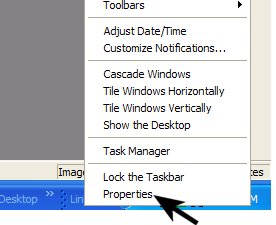
Step 1 Right Click the lower right hand corner of your system tray as shown in the image below.

Step 2 Choose Properties from the drop down menu that appears, as shown below:
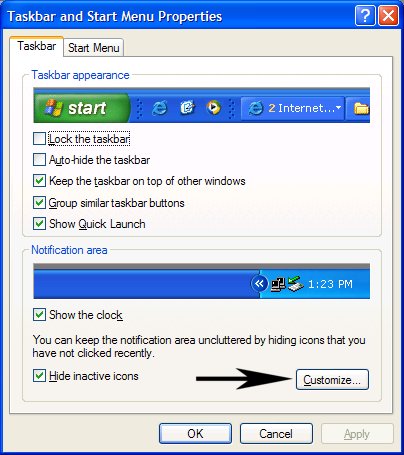
Step 3 The following window will open. Click Taskbar tab. If you want all the icons to show all the time, Uncheck the Hide inactive Icons button. If you want to pick and choose which to hide/unhide, then choose Customize.
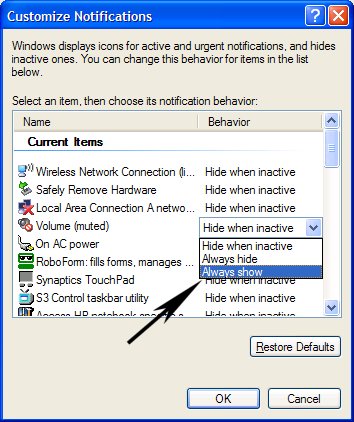
Step 4 The window that appears will look like the one below. Find "Volume" in the list, click it once, then click the little blue arrow next to it to open the drop down menu of choices, and choose "Always Show". Now click OK
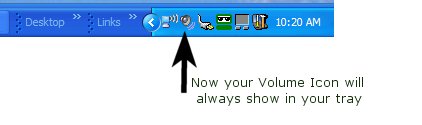
Step 5 You are all done! You can use the same steps listed here to change the behavior of other icons in your System Tray too!
Thanks for stopping by!
Susan Snyder
Practical Computing Solutions, LLC
Contact us today!
http://www.pcstraining.net or our newest website http://www.buildyourskills.com
Tuesday, June 23, 2009
What to Ask Webinar Providers to Get the Deal That is Best For You
By [http://ezinearticles.com/?expert=Graham_Johanssen]Graham Johanssen
Big savings can be made for all businesses big and small using the technology of webinar providers. This is can be done instead of the traditional face to face meetings which can cost all involved time and money which could be used in other areas. As well as helping the environment with less travel carbon emissions, webinars are giving businesses the ability to contact more people world wide more effectively. Webinars can never replace all of the 500+ meetings some large company managers have to attend in an average year, but they can replace a great deal of them.
The number of webinar providers has increased over the last few years due to the high growth in the usage of webinars by those in the corporate world who have the foresight to see the massive potential to get in touch with any number of people world-wide simultaneously. As such some webinar providers with their fancy wording in their advertising campaigns are making offers that appear too good to be true. So how can you select the best from the rest?
When looking through the list of prospective webinar providers, there are a few questions you can ask which could save you a lot of money in the longer term.
1. Including the phone calls how much will a conference call cost? Advertised free conference calls can at times be more expensive than paid services due to higher call rates.
2. When does the charging start? When the first person dials up or when the host arrives? Some participants can ring in up to 10 minutes before a conference call even starts.
3. Are you charged for people who are booked in for the call but fail to show? Webinars are pre booked when many participants are expected, but not everyone will show up. Make sure you are not charged for no-shows.
4. Are charges separated into local & international on a conference call. Can you get an itemised break down of calls so as to make sure you are not charged at the highest rate for all calls.
5. If any premium prices seem to be high, question them. What is so special about that service? Check with to one or two other reputable services to find out if they offer the same and what is their rate.
Shopping around and asking webinar providers these questions will make sure you are not being taken in by fancy mass advertising propaganda that could cost you a great deal if tied up in a contract.
There are many webinar providers around for you to examine. So to save you time please [http://www.squidoo.com/Webinar_Providers]visit my web site to find out who passes all these questions to give you great service.
Graham a retired army veteran specializing in communications. A keen interest in computer technology, fitness, health and wellness. He uses FREE webinars to keep in contact with family, friends and network marketing team that are spread around the world.
Article Source: http://EzineArticles.com/?expert=Graham_Johanssen http://EzineArticles.com/?What-to-Ask-Webinar-Providers-to-Get-the-Deal-That-is-Best-For-You&id=2316302
Interested in finding out more about learning more about hosting and setting up Webinars? Sign up for our preview class on Thursday, July 10, at 10 a.m. CST. Only $20 for a one hour preview class with time for questions. However, if that time does not work for you, the recording will be available so that you can listen at any time!
Sign up today at http://www.buildyourvaskills.com/
Susan Snyder
Practical Computing Solutions, LLC
Contact us today!
http://http://www.pcstraining.net/ or our newest website http://http://www.buildyourskills.com/
Big savings can be made for all businesses big and small using the technology of webinar providers. This is can be done instead of the traditional face to face meetings which can cost all involved time and money which could be used in other areas. As well as helping the environment with less travel carbon emissions, webinars are giving businesses the ability to contact more people world wide more effectively. Webinars can never replace all of the 500+ meetings some large company managers have to attend in an average year, but they can replace a great deal of them.
The number of webinar providers has increased over the last few years due to the high growth in the usage of webinars by those in the corporate world who have the foresight to see the massive potential to get in touch with any number of people world-wide simultaneously. As such some webinar providers with their fancy wording in their advertising campaigns are making offers that appear too good to be true. So how can you select the best from the rest?
When looking through the list of prospective webinar providers, there are a few questions you can ask which could save you a lot of money in the longer term.
1. Including the phone calls how much will a conference call cost? Advertised free conference calls can at times be more expensive than paid services due to higher call rates.
2. When does the charging start? When the first person dials up or when the host arrives? Some participants can ring in up to 10 minutes before a conference call even starts.
3. Are you charged for people who are booked in for the call but fail to show? Webinars are pre booked when many participants are expected, but not everyone will show up. Make sure you are not charged for no-shows.
4. Are charges separated into local & international on a conference call. Can you get an itemised break down of calls so as to make sure you are not charged at the highest rate for all calls.
5. If any premium prices seem to be high, question them. What is so special about that service? Check with to one or two other reputable services to find out if they offer the same and what is their rate.
Shopping around and asking webinar providers these questions will make sure you are not being taken in by fancy mass advertising propaganda that could cost you a great deal if tied up in a contract.
There are many webinar providers around for you to examine. So to save you time please [http://www.squidoo.com/Webinar_Providers]visit my web site to find out who passes all these questions to give you great service.
Graham a retired army veteran specializing in communications. A keen interest in computer technology, fitness, health and wellness. He uses FREE webinars to keep in contact with family, friends and network marketing team that are spread around the world.
Article Source: http://EzineArticles.com/?expert=Graham_Johanssen http://EzineArticles.com/?What-to-Ask-Webinar-Providers-to-Get-the-Deal-That-is-Best-For-You&id=2316302
Interested in finding out more about learning more about hosting and setting up Webinars? Sign up for our preview class on Thursday, July 10, at 10 a.m. CST. Only $20 for a one hour preview class with time for questions. However, if that time does not work for you, the recording will be available so that you can listen at any time!
Sign up today at http://www.buildyourvaskills.com/
Susan Snyder
Practical Computing Solutions, LLC
Contact us today!
http://http://www.pcstraining.net/ or our newest website http://http://www.buildyourskills.com/
5 Reasons Why Hosting a Teleseminar is Great For Business
By [http://ezinearticles.com/?expert=Alicia_Dunams]Alicia Dunams
If you are an information marketer, you are probably well aware of the power that a teleseminar can hold when it comes to building your list and generating profits. Hosting a teleseminar is one of the least expensive ways to get the word out about your products and services while offering valuable information to your listeners.
5 important reasons why you need to host a teleseminar now.
Reason #1: Lead generation source. Teleseminars are a lead generation magnet! Do you want to build your list? Teleseminars are one of the best (if not THE best) ways to start generating leads by giving them free valuable information in a no-pressure format. (If your message doesn't resonate with them, they can simply hang up.)
Reason #2: Direct connection. When you are hosting a call, you have a direct connection with your listeners (potential customers). Create a compelling topic and write a well-thought out script so you can leverage this connection for a high conversion rate of buyers!
Reason #3: Build your brand. When you host a teleseminar, you become the voice for your brand. Building a brand makes your business worth more and creates customer confidence (meaning your potential for sales increase).
Reason #4: Message portability! Teleseminars can be listened to anywhere a phone can go. Whether a caller is driving in his car, working at the office or working out at the gym- your teleseminar can be playing in his or her ear!
Reason #5: Build customer loyalty. By giving your callers valuable information for free, you are building a list of followers who will want more of you until eventually they will have to buy!
Now that you can clearly see how powerful teleseminars can be, it is time to come up with information that your target market wants and set up your call. Take 4-6 weeks to create an Opt In page, write your follow up emails, find a guest to interview on the call, draft a script and create your backend offer. Once you have completed these tasks, it will be time to promote your event and get ready for the leads to start pouring in!
Alicia Dunams is the co-founder of See You On The Call, a free teleseminar listing email service.
List your teleseminar for FREE now at http://SeeYouOnTheCall.com
Article Source: http://EzineArticles.com/?expert=Alicia_Dunams http://EzineArticles.com/?5-Reasons-Why-Hosting-a-Teleseminar-is-Great-For-Business&id=2274330
Interested in finding out more about learning more about hosting and setting up Teleseminars? Sign up for our preview class on Thursday, July 10, at 10 a.m. CST. Only $20 for a one hour preview class with time for questions. However, if that time does not work for you, the recording will be available so that you can listen at any time!
Sign up today at http://www.buildyourvaskills.com
Susan Snyder
Practical Computing Solutions, LLC
Contact us today!http://www.pcstraining.net/ and our newest website http://www.buildyourskills.com
If you are an information marketer, you are probably well aware of the power that a teleseminar can hold when it comes to building your list and generating profits. Hosting a teleseminar is one of the least expensive ways to get the word out about your products and services while offering valuable information to your listeners.
5 important reasons why you need to host a teleseminar now.
Reason #1: Lead generation source. Teleseminars are a lead generation magnet! Do you want to build your list? Teleseminars are one of the best (if not THE best) ways to start generating leads by giving them free valuable information in a no-pressure format. (If your message doesn't resonate with them, they can simply hang up.)
Reason #2: Direct connection. When you are hosting a call, you have a direct connection with your listeners (potential customers). Create a compelling topic and write a well-thought out script so you can leverage this connection for a high conversion rate of buyers!
Reason #3: Build your brand. When you host a teleseminar, you become the voice for your brand. Building a brand makes your business worth more and creates customer confidence (meaning your potential for sales increase).
Reason #4: Message portability! Teleseminars can be listened to anywhere a phone can go. Whether a caller is driving in his car, working at the office or working out at the gym- your teleseminar can be playing in his or her ear!
Reason #5: Build customer loyalty. By giving your callers valuable information for free, you are building a list of followers who will want more of you until eventually they will have to buy!
Now that you can clearly see how powerful teleseminars can be, it is time to come up with information that your target market wants and set up your call. Take 4-6 weeks to create an Opt In page, write your follow up emails, find a guest to interview on the call, draft a script and create your backend offer. Once you have completed these tasks, it will be time to promote your event and get ready for the leads to start pouring in!
Alicia Dunams is the co-founder of See You On The Call, a free teleseminar listing email service.
List your teleseminar for FREE now at http://SeeYouOnTheCall.com
Article Source: http://EzineArticles.com/?expert=Alicia_Dunams http://EzineArticles.com/?5-Reasons-Why-Hosting-a-Teleseminar-is-Great-For-Business&id=2274330
Interested in finding out more about learning more about hosting and setting up Teleseminars? Sign up for our preview class on Thursday, July 10, at 10 a.m. CST. Only $20 for a one hour preview class with time for questions. However, if that time does not work for you, the recording will be available so that you can listen at any time!
Sign up today at http://www.buildyourvaskills.com
Susan Snyder
Practical Computing Solutions, LLC
Contact us today!
Monday, June 22, 2009
Why HTML is Still a Must Have Skill For Website Owners
By [http://ezinearticles.com/?expert=John_T_Anderson]John T Anderson
Is learning HTML still necessary these days?
Surely, you may think, with web editors like Dreamweaver that do all the background coding for you, people don't need to learn such things anymore.
The fact is, even with all the best tools in the World, there will always be times when you want to "dip into" your HTML code and make some changes. For example, many sites (such as YouTube) allow you to embed videos into your own pages - they'll provide the code, but you need to know where to put it.
You could outsource basic HTML tasks, but even a simple task (like adding a hyperlink) could cost you dozens of dollars to outsource. Wouldn't it just be easier to spend 30 seconds doing it yourself... and with the ability to change it back if you don't like it?
The good news in HTML is one of the easiest computer languages to learn. In fact, that's why it was developed - to let novices add to the new "world wide web" of pages. Now, two decades after its invention, millions of people have learned the language.
While you may have been put off after trying to lift one of those 400 page textbooks off the shelf of your local bookstore, the basics can be learned in just a few minutes.
HTML is built around the idea of "tagging" - you wrap text you want to format in particular ways with simple codes. For example, if you wanted to make some text bold, you just wrap it in <> tags (e.g. this is <>bold< / b >)
The important thing to realize is that HTML is not difficult, and you shouldn't be put off. If you're able to use the Internet, you should be competent enough to code your own HTML. With courses like One Hour HTML, it's possible to have a good understanding of the language very quickly and easily.
So don't lock yourself out of your own site - unlock HTML, and discover that you may be a little smarter than you think!
John Anderson runs several websites, and helped contribute to One Hour HTML ( http://www.onehourhtml.com), a unique course that helps you learn the language of the web in under 60 minutes.
Article Source: http://EzineArticles.com/?expert=John_T_Anderson http://EzineArticles.com/?Why-HTML-is-Still-a-Must-Have-Skill-For-Website-Owners&id=2373377
Interested in finding out more about learning HTML? Training for this software is available at very reasonable prices -- we can save you time and money. Sign up for our preview class on Thursday, June 25, 10 a.m. CST, only $20 for a one hour preview class with time for questions. However, if that time does not work for you, the recording will be available so that you can listen at any time!
Sign up today at http://www.buildyourvaskills.com
Susan Snyder
Practical Computing Solutions, LLC
Contact us today!http://www.pcstraining.net/ and our newest website http://www.buildyourskills.com
Is learning HTML still necessary these days?
Surely, you may think, with web editors like Dreamweaver that do all the background coding for you, people don't need to learn such things anymore.
The fact is, even with all the best tools in the World, there will always be times when you want to "dip into" your HTML code and make some changes. For example, many sites (such as YouTube) allow you to embed videos into your own pages - they'll provide the code, but you need to know where to put it.
You could outsource basic HTML tasks, but even a simple task (like adding a hyperlink) could cost you dozens of dollars to outsource. Wouldn't it just be easier to spend 30 seconds doing it yourself... and with the ability to change it back if you don't like it?
The good news in HTML is one of the easiest computer languages to learn. In fact, that's why it was developed - to let novices add to the new "world wide web" of pages. Now, two decades after its invention, millions of people have learned the language.
While you may have been put off after trying to lift one of those 400 page textbooks off the shelf of your local bookstore, the basics can be learned in just a few minutes.
HTML is built around the idea of "tagging" - you wrap text you want to format in particular ways with simple codes. For example, if you wanted to make some text bold, you just wrap it in <> tags (e.g. this is <>bold< / b >)
The important thing to realize is that HTML is not difficult, and you shouldn't be put off. If you're able to use the Internet, you should be competent enough to code your own HTML. With courses like One Hour HTML, it's possible to have a good understanding of the language very quickly and easily.
So don't lock yourself out of your own site - unlock HTML, and discover that you may be a little smarter than you think!
John Anderson runs several websites, and helped contribute to One Hour HTML ( http://www.onehourhtml.com), a unique course that helps you learn the language of the web in under 60 minutes.
Article Source: http://EzineArticles.com/?expert=John_T_Anderson http://EzineArticles.com/?Why-HTML-is-Still-a-Must-Have-Skill-For-Website-Owners&id=2373377
Interested in finding out more about learning HTML? Training for this software is available at very reasonable prices -- we can save you time and money. Sign up for our preview class on Thursday, June 25, 10 a.m. CST, only $20 for a one hour preview class with time for questions. However, if that time does not work for you, the recording will be available so that you can listen at any time!
Sign up today at http://www.buildyourvaskills.com
Susan Snyder
Practical Computing Solutions, LLC
Contact us today!
Monday, June 1, 2009
A Simple Guide to Online Fax
A Simple Guide To Online Fax
Author: Titus HoskinsCopyright (c) 2009 Titus Hoskins
While most people have heard of email, there are many web users who have never heard of Internet or online fax. This is the equivalent of sending faxes via the web rather than through the old traditional facsimile machine in the office.
Like email, web faxing is a relatively new phenomenon which simply means using the Internet and your email system to send and receive your faxes. In order to use online fax you have to sign up for an account with an Internet fax service provider, who will supply you with a Toll-Free or local fax number you can use. Your faxes are sent as email attachment, usually in TIFF or PDF format.
Your online fax service provider acts as your intermediary to handle and process all your faxing. Keep in mind, with an Internet faxing account you don't need an extra dedicated fax phone line because everything is done via the web. However, you can still send faxes to and from the old traditional fax machine, your online provider will act on your behalf to process your faxes.
With an Internet fax service you are generally given an online site (interface) where you can log-on to send and receive your faxes. This web account will also store your faxes so that they are available to you at all times. How long and the amount of faxes you can store will depend upon which service you choose, so it pays to do a little homework first before you sign up to any one service.
These fax providers will also have different monthly rates but the average cost is around $10 a month, but there are much cheaper quality services you can get, especially if your faxing requirements are very minimum. Some services are as low as $20 a year or you can also get a pay as you go service.
Why are millions of individuals and companies switching over to this new way of faxing?
There are many reasons: online faxing can be much cheaper especially when you factor in the low start-up costs and the cost of a separate phone line. Online fax is paperless so it is seen as more environmentally friendlier than regular faxing. It also uses no inks, toners and there are none of those messy annoying paper jams. No more missed faxes because of busy signals. You can also send many faxes simultaneously. Web faxing can also be much more secure than traditional faxing since your faxes can be encrypted. Plus, all your faxing is completely mobile, you can send and receive your faxes anywhere, anytime - as long as you have Internet access and these days that's just about everywhere on the planet.
This new way of faxing is much more convenient since you can use laptops, PDAs, cell phones... to send and receive your faxes. It is also extremely easy to use, as simple as using email, anyone can do it. Furthermore, online faxing is seen as the wave of the future, connecting all your faxing with computers and the web.
Plus, we must not forget about the whole concept of competitiveness when speaking about online fax. If your business or company depends heavily on timely faxes for bringing in sales, closing deals or communicating with clients; then having a fax service that's available 24/7, 365 days of the year (regardless of where you're located) is a definite advantage to have in your corner. Sometimes it may just be a matter of keeping up with your competition who might already be using web faxing in their own businesses.
Your next obvious questions should be: can your business or company afford NOT to have it? It's your call!
For more information on Internet Fax Services use this handy online Comparison Guide: online fax Or if you want more detailed information on Internet Faxing try here: internet fax services Titus Hoskins 2009. This article may be freely distributed if this resource box stays attached.
Article Source: ArticlesBase.com - A Simple Guide To Online Fax
Hope this helps anyone considering this option. As always, if you have a comment or suggestion for our blog, please contact us!
http://www.pcstraining.net
Practical Computing Solutions, LLC
Susan Snyder
Subscribe to:
Posts (Atom)